Receive from your
imaging network.
Receive DICOM objects from configured senders, or query and retrieve studies from a connected PACS.
DICOM receive + PACS retrieval Buy MedDisc
MEDICAL IMAGING · DISC PUBLISHING
Bring DICOM studies from your imaging network to patient media—with study selection, disc publishing, and MedView in one Windows application.

CONNECT. COLLECT. PUBLISH.
THE MEDDISC WORKSPACE
Find your studies, review your selection, and choose the destination. Keep the essential steps together.
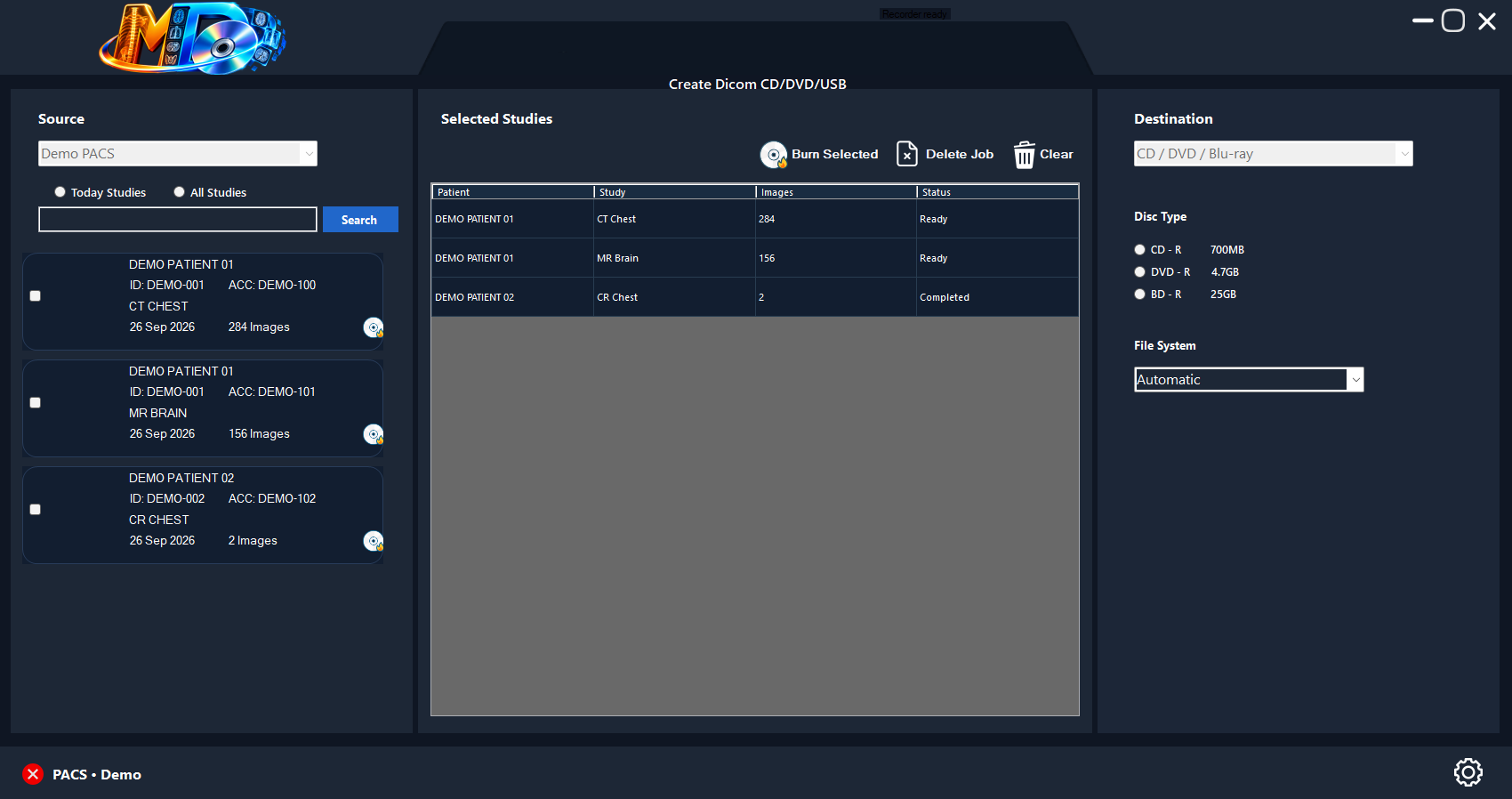
The current MedDisc interface, rendered with demonstration data.
Demo patients only · No clinical dataPURPOSE-BUILT FOR IMAGING
The tools for receiving, organizing, and publishing medical imaging—brought into one workspace.
Receive DICOM objects from configured senders, or query and retrieve studies from a connected PACS.
DICOM receive + PACS retrievalSelect multiple studies for a shared disc job. Review the study list and choose media to suit the combined size.
Multiple studies per discPackage MedView alongside the studies and DICOMDIR so recipients have a viewer with their imaging files.
MedView + DICOMDIRPrepare larger jobs across multiple discs, allowing space for study files, the viewer, and disc structure.
Build and check the disc index against the prepared files and their patient, study, series, and instance hierarchy.
Choose a configured recorder and a write speed supported by the drive and media.
Finalize optical discs after writing, with optional verification of the burned content.
Submit prepared disc jobs with a configured label template and follow publisher status.
See receiving and publishing status, review completed jobs, and identify jobs requiring attention.
A CONNECTED WORKFLOW
Support the journey from the imaging network to physical media, with job progress visible along the way.
Explore the workspaceUse DICOM receiving or select studies through PACS query and retrieval.
Check the selected studies and destination. MedDisc prepares the files, DICOMDIR, and configured viewer.
Use a configured optical recorder or submit publishing jobs to your Epson workflow.
Monitor publishing progress and review the final job status before handing over the disc.
PUBLISH YOUR WAY
Choose the publishing setup that fits your department and the size of your imaging studies.
Recorder selection, supported write speeds, disc finalization, and optional verification.
Usable capacity varies. Study files, the viewer, and disc structure all occupy space.Prepare disc content and submit jobs through a configured Epson publishing environment, with job status tracking inside MedDisc.
DOWNLOAD MEDDISC
Get the Windows package and guidance for connecting MedDisc to your imaging and publishing environment.
Contact BOSS-InfoTech for the current installer and evaluation details.
Download for WindowsThe installer is supplied by BOSS-InfoTech.Confirm the supported Windows version and prerequisites for your installer with BOSS-InfoTech.
LICENSING & PURCHASE
Discuss licensing and deployment with BOSS-InfoTech. Get a quote for your workstation and publishing requirements.
DICOM receiving, PACS retrieval, multi-study disc jobs, MedView packaging, and publishing controls.
GOOD TO KNOW
Yes. MedDisc supports selecting multiple studies for a shared disc job. The combined study data, viewer, and disc files must fit the chosen media. Larger jobs may require higher-capacity media or multiple discs.
MedView is the default viewer and can be included with the disc content. Viewer inclusion depends on the configured package being available.
MedDisc supports DICOM receiving and PACS query/retrieve workflows. Compatibility depends on the sender's DICOM services, transfer syntaxes, network settings, and configuration. Validate the intended workflow with your PACS or modality before routine use.
A configured Windows workstation, a suitable optical recorder and media, or a compatible Epson publishing environment. Network receiving also requires the appropriate DICOM AE titles, ports, and connectivity.
Use Request Windows Download to email BOSS-InfoTech for the current installation package and evaluation details. Install the supplied package and follow its setup instructions.
Use Buy MedDisc to contact sales with your organization, workstation count, and publishing setup. BOSS-InfoTech will confirm pricing, license terms, and activation instructions.
MedDisc packages the configured MedView viewer with authorized imaging media. Its capabilities depend on the bundled build. MedView Full is a separately licensed desktop application; the advanced features described in the viewer section are not a promise that every disc bundle includes them. Confirm the supplied build and any license entitlement with BOSS-InfoTech.
The current MedView Full page lists recursive folder import, 1/2/4/8-pane review, linked MPR and oblique planes, GPU-assisted 3D with CPU fallback, tissue selection tools, editable measurements, DICOM Structured Reports, saved workspaces, and PNG, DICOM Secondary Capture, and AVI exports. Reconstruction and measurements depend on the source data. See the MedView website for current edition details and desktop requirements.